Privli for Linux
AirDrop-style sharing for Linux, at home on Omarchy
Privli sends files and your clipboard between your Linux computer and the iPhone, Android phone, Mac or Windows PC next to it, over Wi-Fi or Bluetooth. No internet, no account, no data collection, and it’s free on Linux. It lives in your tray, works with Android’s built-in Quick Share, and on Omarchy it wears your theme.
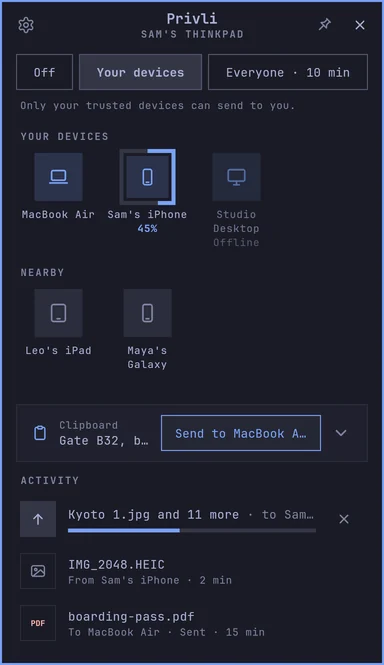
Made to look native on Omarchy
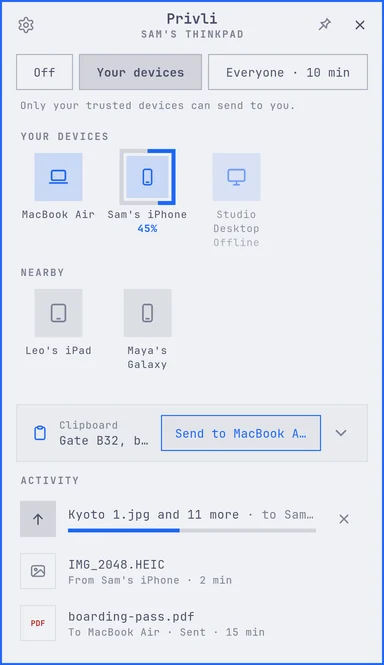
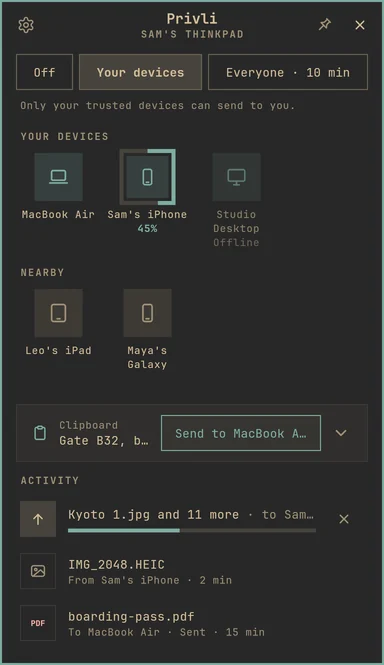
In an Omarchy session, Privli’s panel takes its look from your desktop instead of bringing its own. Change something in Omarchy and the panel follows, even while it’s open.
- Your theme’s colors. Switch themes and the panel switches with you, live.
- Hyprland’s corners: square in every stock theme, rounded in Solitude, with the same 2-pixel border and no shadow as the shell’s own popups.
- Your monospace font (JetBrainsMono Nerd Font out of the box), at the shell’s text sizes.
- A tray icon in the bar’s text color, with a dot in the accent color when someone wants to send you something.
- Prefer Privli’s own look? Start it with PRIVLI_OMARCHY_LOOK=0.
The same panel in three Omarchy themes
At home on any desktop
- On Hyprland, Sway, KDE Plasma and niri, the panel drops down from the bar. Click anywhere else or press Esc to put it away.
- On GNOME and other desktops, it opens as a small window.
- Right-click files in Files (Nautilus) and choose Send with Privli, then a device. Or drag them onto a device in the panel.
- Requests and received files arrive as desktop notifications.
- The tray icon works in any bar with a system tray (StatusNotifierItem).
Already have LocalSend?
Omarchy ships with LocalSend, and it’s a great way to move files between devices on the same Wi-Fi. Privli adds what it can’t do, and the two run side by side.
Phones without any app
Privli speaks Android’s built-in Quick Share, so a friend’s phone can receive with nothing installed. They choose Everyone in Quick Share, and the phone shows up in Privli.
No shared Wi-Fi
When your devices aren’t on the same network, Privli finds them and sends over Bluetooth instead.
Your clipboard, everywhere
Copy on one device, paste on another. Between your computers, the clipboard can even sync on its own.
Privli listens on ports 53318–53327, right next to LocalSend’s 53317, so neither gets in the other’s way.
Install
yay -S privli-binAURFor 64-bit x86 (x86_64) computers. Free, with no ads and no account.
Using ufw?
Omarchy turns on the ufw firewall, which keeps phones from reaching your computer over Wi-Fi. Allow Privli’s ports once (Privli’s first-run screen offers to do it for you):
sudo ufw allow 53318:53327/tcp comment PrivliFrequently asked questions
Does Privli work on Omarchy?
Yes. Install it from the AUR with yay -S privli-bin. On Omarchy 4 and later, Privli recognizes the session and takes on your theme’s colors, Hyprland’s rounding and your monospace font, and it follows along when you switch themes. Start it with PRIVLI_OMARCHY_LOOK=0 to keep Privli’s own look.
Is there AirDrop for Linux?
Apple doesn’t make AirDrop for Linux. Privli is a cross-platform alternative: install it on your Linux computer and on your iPhone, and send files and your clipboard between them directly, over Wi-Fi or Bluetooth. Privli is free on Linux and a one-time purchase on iPhone.
Can I use Quick Share on Linux?
Google doesn’t make a Quick Share app for Linux. Privli is compatible with Quick Share, so your Linux computer can share with Android phones through their built-in Quick Share: set the phone’s Quick Share visibility to Everyone, and it shows up in Privli.
Which desktops and distributions does Privli support?
Privli comes as an AUR package, a .deb, an .rpm and a tar.gz for 64-bit x86 computers. On Hyprland, Sway, KDE Plasma and niri, the panel drops down from the bar; on GNOME and other desktops, it opens as a small window.
My phone can’t reach my Linux computer over Wi-Fi. What should I check?
Usually it’s the firewall. With ufw (on by default in Omarchy), run sudo ufw allow 53318:53327/tcp comment Privli once, or accept the offer on Privli’s first-run screen. When there’s no shared Wi-Fi, Privli uses Bluetooth instead.
Can Privli and LocalSend run at the same time?
Yes. They use different ports (LocalSend 53317, Privli 53318–53327), so you can keep both. LocalSend talks to other LocalSend apps; Privli talks to Privli and to Quick Share.